Apache Spark
Apache Spark is a in memory - distributed data analytics engine. It is a unified engine for big data processing. Unified means it offers both batch and stream processing.
Apache Spark overcame the challenges of Hadoop with in-memory parallelization and delivering high performance for distributed processing.
Increase developer productivity and can be seamlessly combined to create complex workflows.
Features of Apache Spark
- Analytics and Big Data processing.
- Machine learning capabilities.
- Huge open source community and contributors.
- A distributed framework for general-purpose data processing.
- Support for Java, Scala, Python, R, and SQL.
- Integration with libraries for streaming and graph operations.
Benefits of Apache Spark
- Speed (In memory cluster computing)
- Scalable (Cluster can be added/removed)
- Powerful Caching
- Real-time
- Supports Delta
- Polyglot (Knowing/Using several languages. Spark provides high-level APIs in SQL/Scala/Python/R. Spark code can be written in any of these 4 languages.)
Spark Popular Eco System (Core APIs)
- Spark SQL : SQL queries in Spark.
- Streaming : Process realtime data.
- MLib : MLlib allows for preprocessing, munging, training of models, and making predictions at scale on data.
Also it supports Scala, Python, JAVA and R.
Spark Architecture
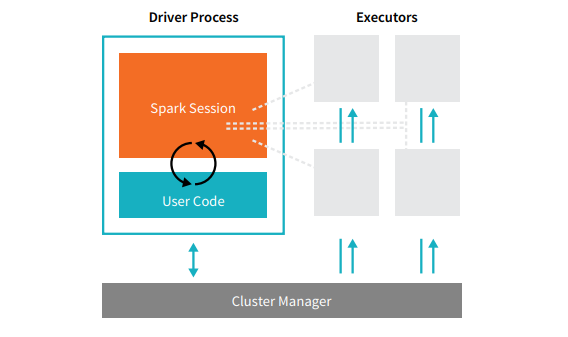
src: www.databricks.com

Cluster Manager: Allocates Students/Faculty for a course. Who is in and who is out.
Driver: Faculty point of entry. Gives instructions and collects the result.
Executor: Table of Students.
Core (Thread): Student
Cores share the same JVM, Memory, Diskspace (like students sharing table resources, power outlets)
Partition
Technique of distributing data across multiple files or nodes in order to improve the query processing performance.
By partitioning the data, you can write each partition to a different executor simultaneously, which can improve the performance of the write operation.
Spark can read each partition in parallel on a different executor, which can improve the performance of the read operation.
Bowl of candies how do sort and count by color?

If its with one person, then others are wasting their time. Instead if its packaged into small packs (partitions) then everyone can work in parallel.
Default size is 128MB and its configurable.
Data ready to be processed
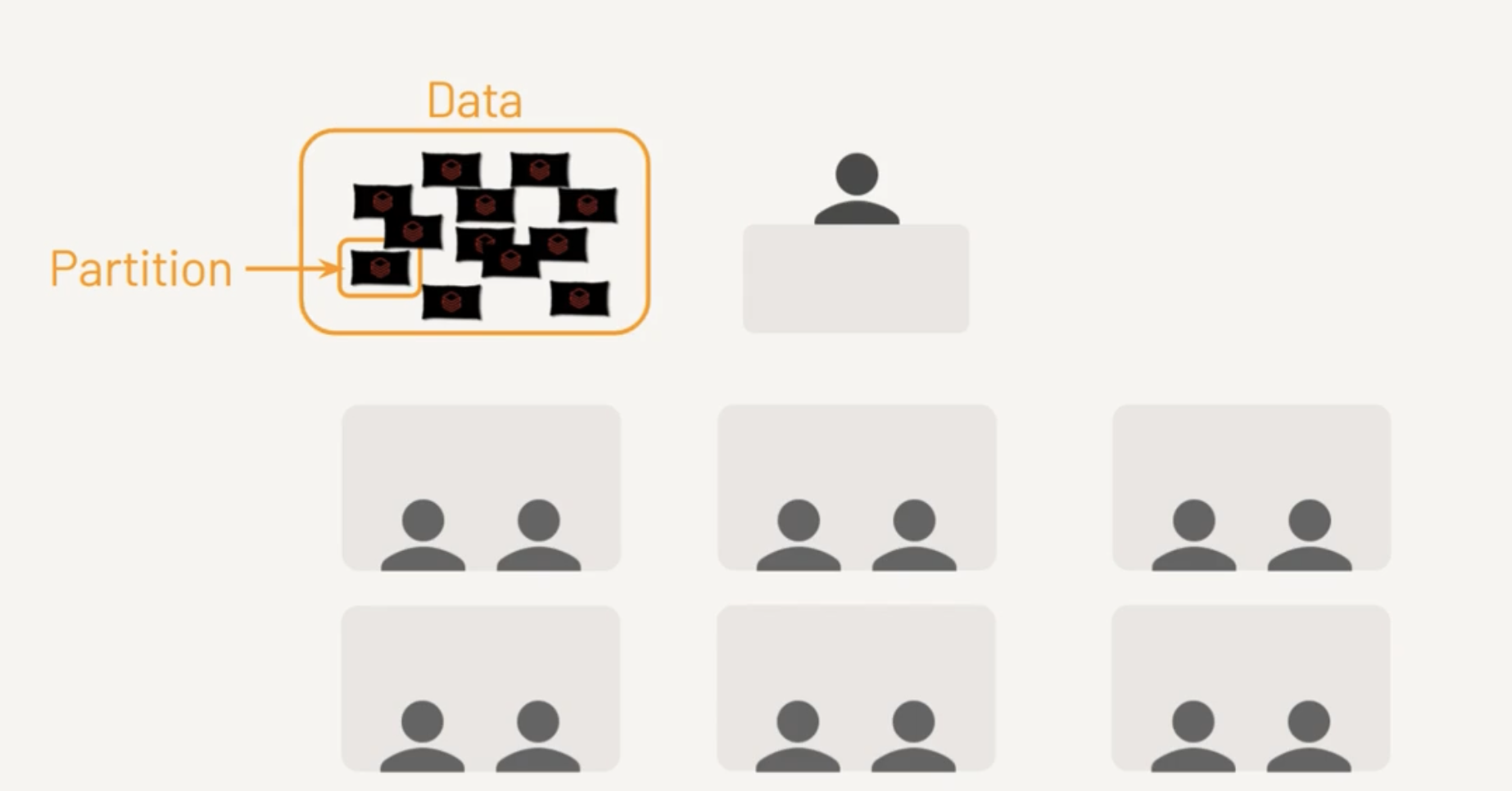
Each Core is assigned a Task
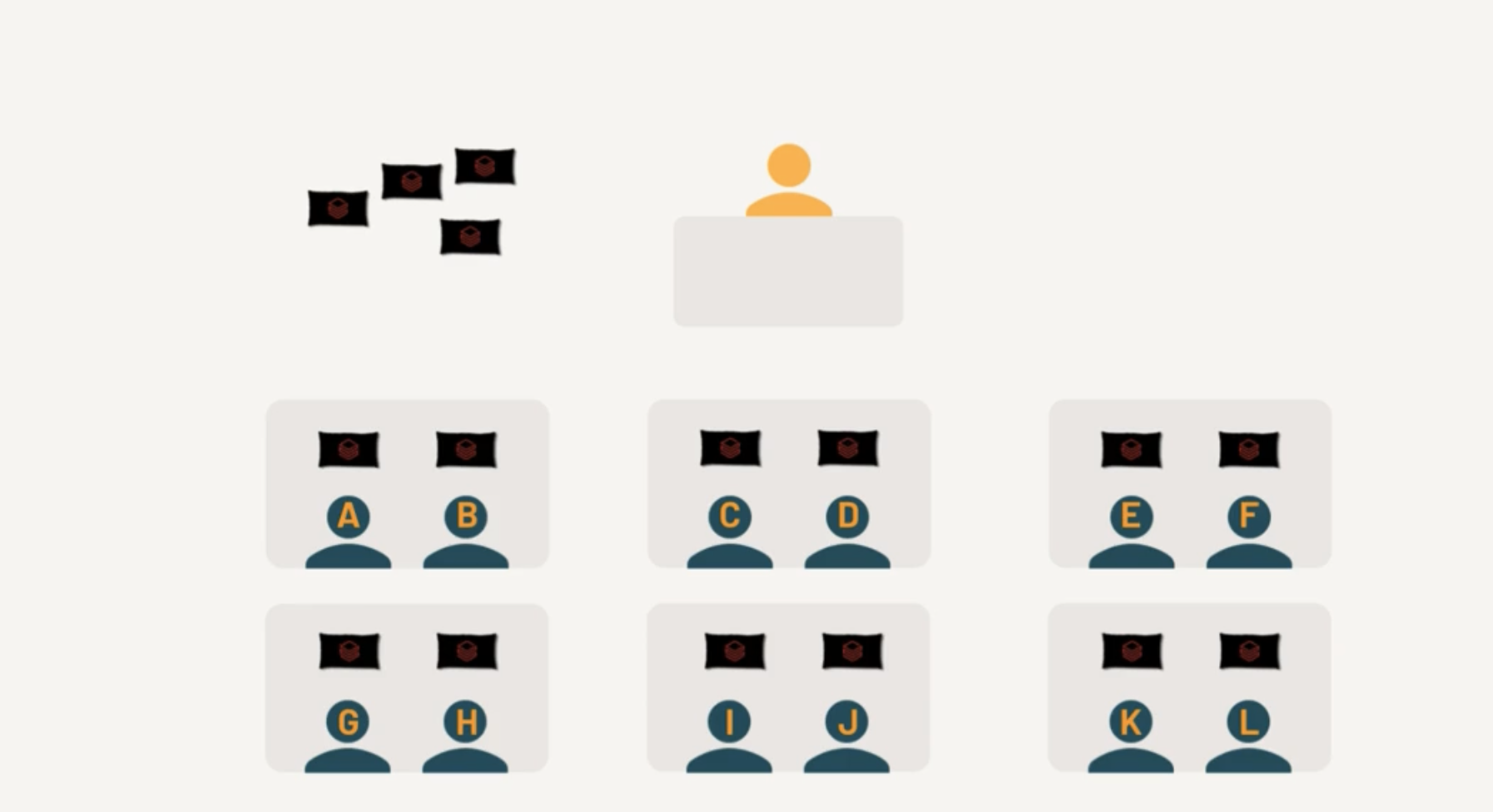
Few cores completed the Tasks
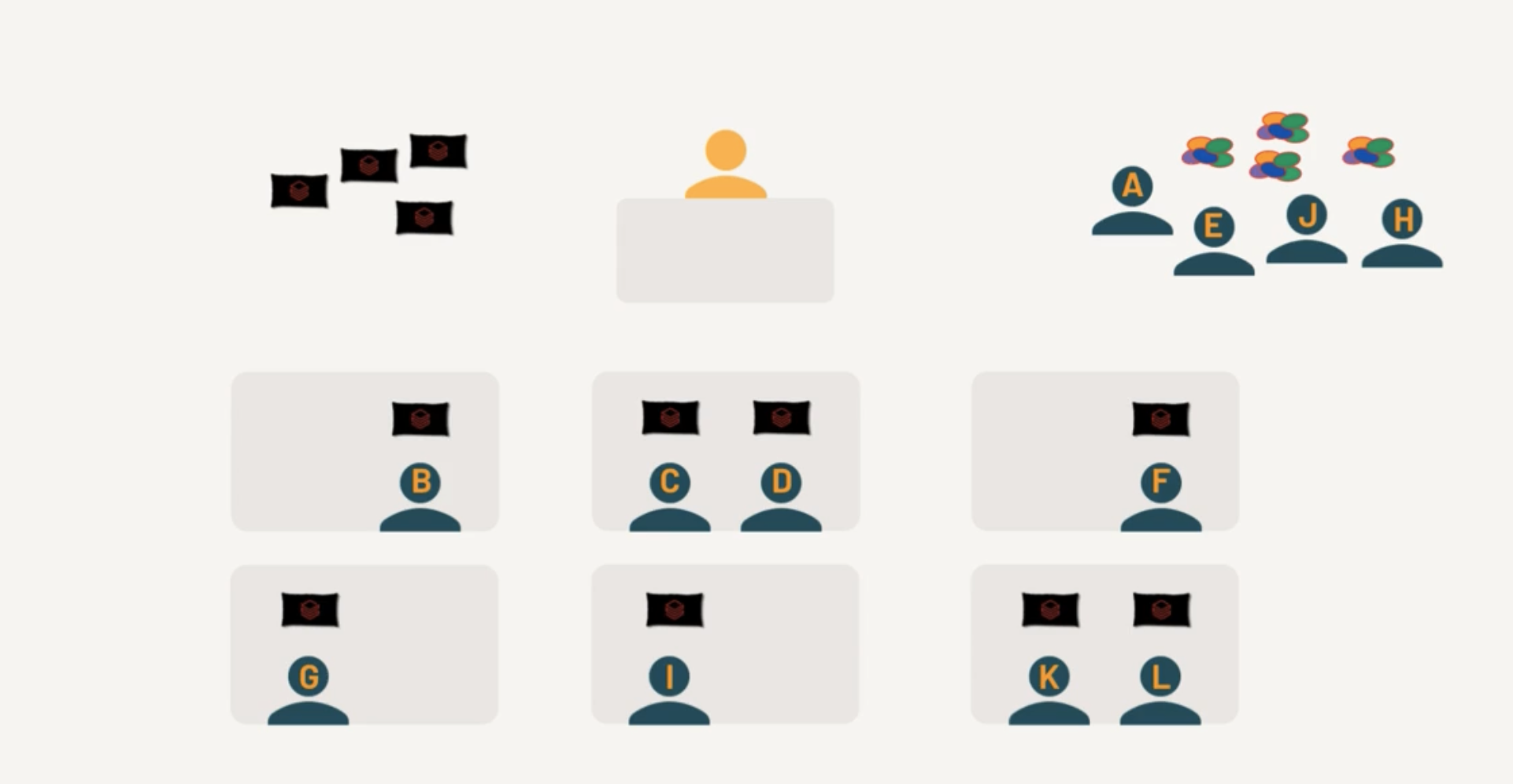
Free Cores picks up the remaining Tasks

Terms to learn
Spark Context
Used widely in Spark Version 1.x
Spark Context : Used by Driver node to establish communication with Cluster. SparkContext is an object that represents the entry point to the underlying Spark cluster, which is responsible for coordinating the processing of distributed data in a cluster. It serves as a communication channel between the driver program and the Spark cluster.
When a Databricks cluster is started, a SparkContext is automatically created and made available as the variable sc in the notebook or code. The SparkContext provides various methods to interact with the Spark cluster, including creating RDDs, accessing Spark configuration parameters, and managing Spark jobs.
text_rdd = sc.textFile("/FileStore/tables/my_text_file.txt")
Other entry points
SQL Context : Entry point to perform SQL Like operations. Hive Context : If Spark application needs to communicate with Hive.
In newer versions of Spark, this is not used anymore.
Spark Session
In Spark 2.0, we introduced SparkSession, a new entry point that subsumes SparkContext, SQLContext, StreamingContext, and HiveContext. For backward compatibiilty, they are preserved.
In short its called as "spark".
spark.read.format("csv").
RDD
RDDs (Resilient Distributed Datasets) are the fundamental data structure in Apache Spark. Here are the key aspects:
Core Characteristics:
- Resilient: Fault-tolerant with the ability to rebuild data in case of failures
- Distributed: Data is distributed across multiple nodes in a cluster
- Dataset: Collection of partitioned data elements
- Immutable: Once created, cannot be changed
Key Features:
- In-memory computing
- Lazy evaluation (transformations aren't executed until an action is called)
- Type safety at compile time
- Ability to handle structured and unstructured data
Basic Operations:
Transformations (create new RDD):
- map()
- filter()
- flatMap()
- union()
- intersection()
- distinct()
Actions (return values):
- reduce()
- collect()
- count()
- first()
- take(n)
- saveAsTextFile()
Benefits
- Fault tolerance through lineage graphs
- Parallel processing
- Caching capability for frequently accessed data
- Efficient handling of iterative algorithms
- Supports multiple languages (Python, Scala, Java)
Limitations
- No built-in optimization engine
- Manual optimization required
- Limited structured data handling compared to DataFrames
- Higher memory usage due to Java serialization
Example
Read a CSV using RDD and group by Region, Country except Region=Australia
from pyspark.sql import SparkSession
from operator import add

# Initialize Spark
spark = SparkSession.builder \
    .appName("Sales Analysis RDD") \
    .getOrCreate()

sc = spark.sparkContext

# Read CSV file
rdd = sc.textFile("sales.csv")

# Extract header and data
header = rdd.first()
data_rdd = rdd.filter(lambda line: line != header)

# Transform and filter data
# Assuming CSV format: Region,Country,Sales,...
result_rdd = data_rdd \
    .map(lambda line: line.split(',')) \
    .filter(lambda x: x[0] != 'Australia') \
    .map(lambda x: ((x[0], x[1]), float(x[2]))) \
    .groupByKey() \
    .mapValues(lambda sales: sum(sales) / len(sales)) \
    .sortByKey()

# Display results
print("Region, Country, Average Sales")
for (region, country), avg_sales in result_rdd.collect():
    print(f"{region}, {country}, {avg_sales:.2f}")
Good News you don't have to write direct RDDs anymore.
Now the same using Dataframes
from pyspark.sql import SparkSession
from pyspark.sql.functions import avg

# Initialize Spark
spark = SparkSession.builder \
    .appName("Sales Analysis DataFrame") \
    .getOrCreate()

# Read CSV file
df = spark.read \
    .option("header", "true") \
    .option("inferSchema", "true") \
    .csv("sales.csv")

# Group by and calculate average sales
result_df = df.filter(df.Region != 'Australia') \
    .groupBy('Region', 'Country') \
    .agg(avg('Sales').alias('Average_Sales')) \
    .orderBy('Region', 'Country')

# Show results
result_df.show(truncate=False)
Spark Query Execution Sequence
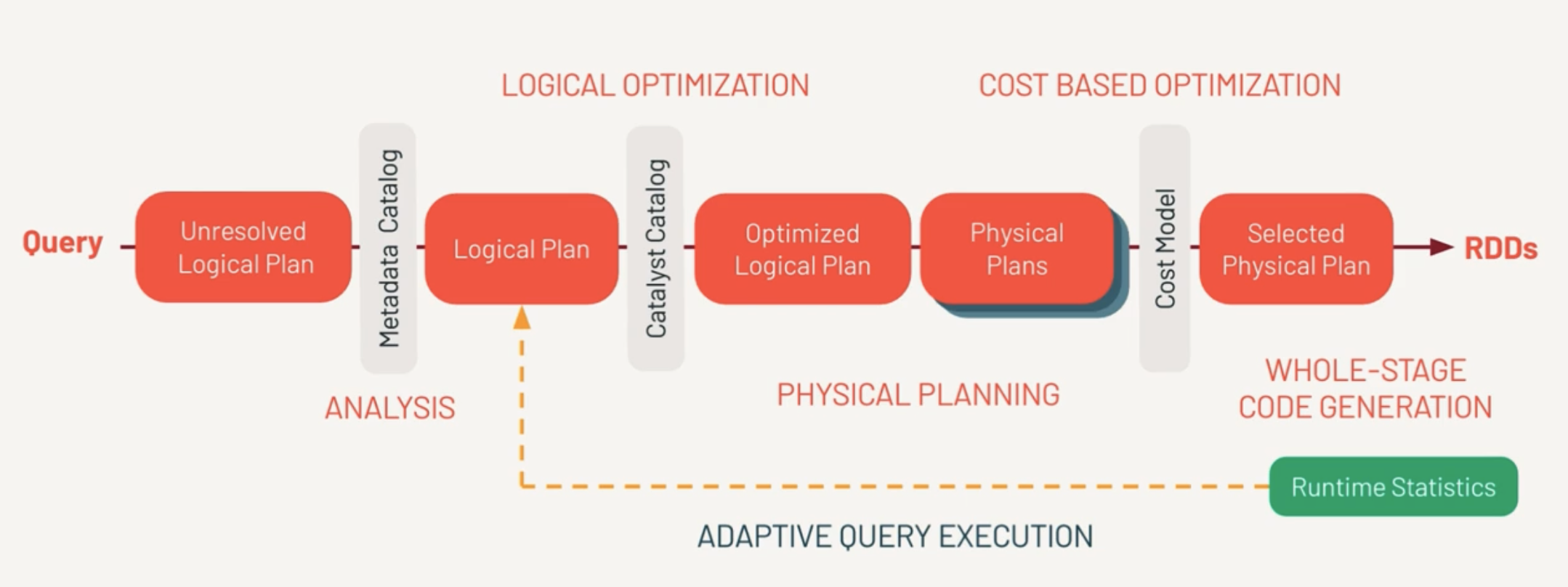
Unresolved Logical Plan
This is the set of instructions the developer logically wants to do.
First, Spark parses the query and creates the Unresolved Logical Plan Validates the syntax of the query.
Doesn’t validate the semantics meaning column name existence, data types.
Metadata Catalog (Analysis)
This is where the column names, table names are validated against Catalog and returns a Logical Plan.
Catalyst Catalog
This is where first set of optimizations takes place. Rewrite/Reorder the logical sequence of calls. From this we get Optimized Logical Plan.
Catalyst Optimizer
Determines there are multiple ways to execute the query. Do we pull 100% of data from the network or filter the dataset with a predicate pushdown? From this, we determine one or more physical plans.
Physical Plans
Multiple ways to execute the query.
Physical Plans represent what the query engine will actually do. This is different from the optimized logical plan. Each optimization determines a cost model.
Selected Physical Plan
And best performing model is selected by Cost Model. Finally the selected physical plan is compiled to RDDs.
- Estimated amount of data needed for processing
- amount of shuffling
- amount of time to execute the query
RDD
(Whole Stage Code Generation)
This the same RDD a developer would write themselves.
AQE (Adaptive Query Execution)
Checks for join strategies, skews at runtime. This happens repeatedly to find out best plan.
- explain(mode="simple") which will display the physical plan
- explain(mode="extended") which will display physical and logical plans (like “extended” option)
- explain(mode="codegen") which will display the java code planned to be executed
- explain(mode="cost") which will display the optimized logical plan and related statistics (if they exist)
- explain(mode="formatted") which will display a splitted output composed by a nice physical plan outline, and a section with each node details
DAG (Direct Acyclic Graph)
Example of DAG
Stage 1 (Read + Filter):
   [Read CSV] → [Filter]
        |
        ↓
Stage 2 (GroupBy + Shuffle):
   [Shuffle] → [GroupBy]
        |
        ↓
Stage 3 (Order):
   [Sort] → [Display]
Databricks
Databricks is a Unified Analytics Platform on top of Apache Spark that accelerates innovation by unifying data science, engineering and business. With our fully managed Spark clusters in the cloud, you can easily provision clusters with just a few clicks.
This is not Databricks Sales so not getting into roots of the product.
Open
Open standards provide easy integration with other tools plus secure, platform-independent data sharing.
Unified
One platform for your data, consistently governed and available for all your analytics and AI,
Scalable
Scale efficiently with every workload from simple data pipelines to massive LLMs.
Lakehouse
Data Warehouse + Data Lake = Lakehouse.

ELT Data Design Pattern
In ELT (Extract, Load, Transform) data design patterns, the focus is on loading raw data into a data warehouse first, and then transforming it. This is in contrast to ETL, where data is transformed before loading. ELT is often favored in cloud-native architectures.
Batch Load
In a batch load, data is collected over a specific period and then loaded into the data warehouse in one go.
Real-time Example
A retail company collects sales data throughout the day and then runs a batch load every night to update the data warehouse. Analysts use this data the next day for reporting and decision-making.
Stream Load
In stream loading, data is continuously loaded into the data warehouse as it's generated. This is useful in scenarios requiring real-time analytics and decision-making.
Real-time Example
A ride-sharing app collects GPS coordinates of all active rides. This data is streamed in real-time into the data warehouse, where it's immediately available for analytics to optimize ride allocation and pricing dynamically.